
A backup is only useful if you can restore it. This guide explains the backup options in cPanel, which one to use when, and how to restore files, databases and email settings without overwriting the wrong thing.
Screenshots come from a real cPanel account with domains and usernames replaced by example values.
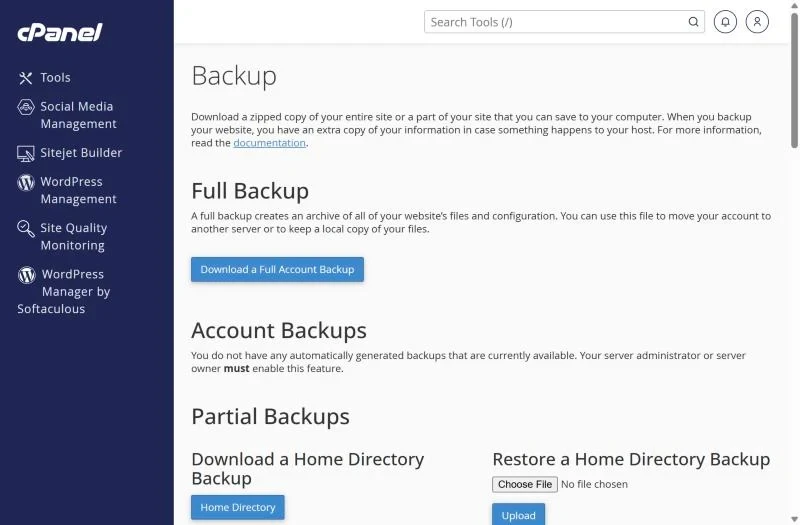
The Backup screen
Open Files → Backup.
| Option | Contains | Use it for |
|---|---|---|
| Full Backup | Everything: files, databases, email, settings | Moving to another server or keeping an offline copy |
| Home Directory | All files incl. email folders | Restoring files yourself |
| MySQL Databases | One .sql.gz per database | Restoring one database |
| Email Forwarders / Filters | Forwarder and filter rules | Rebuilding mail rules |
A full backup can't be restored from cPanel by the customer – it is meant for server moves. To restore yourself, use the partial backups.
Create a full backup
- Click Download a Full Account Backup.
- Choose Home Directory as destination and enter your email to be notified.
- When the email arrives, download the
backup-…tar.gzfile from the Backup page, then delete it from the server so it doesn't fill your disk quota.
Restore files or a database
- Files: under Restore a Home Directory Backup choose the .tar.gz and click Upload. Existing files with the same name are overwritten.
- Database: under Restore a MySQL Database Backup upload the .sql.gz. The database must exist with the same name; the user privileges stay the same.
- For a single file, it is often easier to extract the archive on your computer and upload only that file with File Manager.
Server backups
XMart Host also keeps daily server backups of hosting accounts. If you need a file or database from a past day, open a ticket with the date and what to restore – this works even when your own copies are missing.
Backup won't generate or restore
- Disk full – the backup needs free space roughly the size of your account.
- Upload too large – browser uploads of multi-gigabyte files fail; upload via FTP to your home directory and ask support to restore.
- Wrong format – restore expects the exact files cPanel generated; a re-zipped folder won't work.
Frequently asked questions
How often should I back up?
Weekly for most sites, daily for shops and sites that change every day – and always before updating themes, plugins or PHP.
Where should I keep backups?
Off the server: your computer, Google Drive or cloud storage. A backup on the same account disappears with it.
Daily backups included. XMart Host hosting plans include daily backups and free help restoring them – useful if your site is ever hacked (see fix a hacked website).