
When a hosting account reaches its disk quota, strange things happen at once: WordPress can't upload images, emails bounce with "mailbox full", databases refuse to save and some pages show errors. The fix is to find what is using the space – it is rarely the website itself.
Screenshots come from a real cPanel account with folder names cropped and domains, IPs and usernames replaced by example values.
Step 1: See the total
The cPanel home page shows Disk Usage in the statistics column. If it is at or near 100%, continue below.
Step 2: Find the large folders
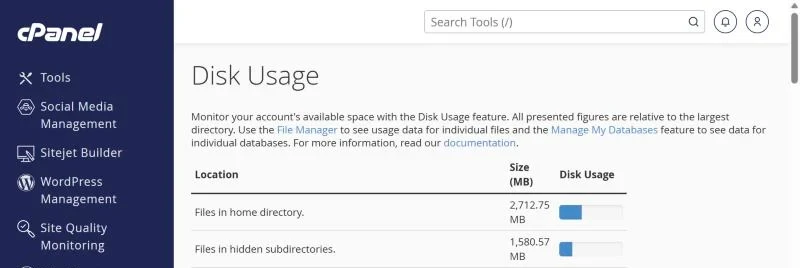
Open Files → Disk Usage. The table lists every folder in your home directory with its size, largest first, plus a line for mail and databases.
The usual space eaters:
- Backup archives – full-account backups (
backup-*.tar.gz), plugin backups inwp-content/updraftorwp-content/ai1wm-backups. Download what you need and delete the rest. - Email – a few mailboxes with years of attachments. Check Email → Email Disk Usage to clean old mail by folder.
- Hidden folders –
.trash(File Manager's trash),.cache, and old.cpaneldata. - Log files – a single
error_logcan grow to gigabytes if a plugin throws warnings on every page. - Old copies – folders like
public_html_oldorsite-backupleft after a redesign.
Step 3: Clean up safely
- Download anything you might need later to your computer first.
- Delete files in File Manager, then empty File Manager's Trash – deleted files still count until it is emptied.
- Delete or truncate big
error_logfiles, then fix the warning that fills them (see reading the error log). - Tell backup plugins to keep only the last 2–3 copies, or store them in Google Drive / S3 instead of on the hosting account.
Database disk quota exceeded
MySQL databases count towards the same quota. When the account is full, WordPress may show "Error establishing a database connection" or fail to save posts. Free space first; then optimise large tables (log tables of security and statistics plugins are often the biggest). The database guide covers repair steps.
Disk usage numbers don't match
cPanel recalculates disk usage periodically, so figures can lag behind recent changes for a while. Mail and database sizes are counted separately from your files.
Frequently asked questions
What happens when my quota is full?
New files and emails can't be written. Your site keeps loading, but uploads, form submissions and incoming email fail until you free space.
Should I delete the "cache" folder?
Cache folders can be emptied safely – they rebuild automatically. Don't delete public_html, mail, etc or ssl.
Need more space? Our shared hosting plans range from 5 GB to unlimited SSD storage, billed in PKR. Upgrading keeps your files and email exactly where they are.