
"500 Internal Server Error" only says that the server hit a problem it couldn't explain to the browser. The real reason is written in the error log, and in more than 90% of the cases we see it is one of five things: a broken .htaccess rule, wrong file permissions, PHP running out of memory, a faulty plugin or theme, or the wrong PHP version. Work through the steps in order.
Screenshots come from a real cPanel account; domains, IPs and usernames are replaced by example values. The log lines shown are typical examples.
Step 1: Read the error log
Open Metrics → Errors in cPanel. The newest entries are at the top – reload your broken page, then refresh the Errors page and look at the first lines.
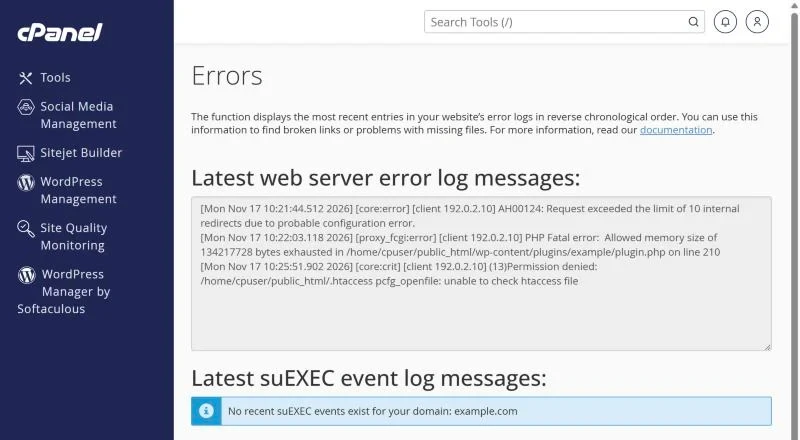
| Log message contains | Cause | Go to |
|---|---|---|
| Invalid command, RewriteRule, "internal redirects" | .htaccess problem or redirect loop | Step 2 |
| Permission denied, "is writable by group" | File or folder permissions | Step 3 |
| Allowed memory size … exhausted | PHP memory limit | Step 4 |
| PHP Fatal error … in /wp-content/plugins/… | Broken plugin or theme | Step 5 |
| Call to undefined function, syntax error | Code not compatible with PHP version | Step 6 |
If the Errors page is empty, also check the error_log file inside public_html (or the folder of the broken page) with File Manager.
Step 2: Test the .htaccess file
- In File Manager open
public_htmland click Settings → Show Hidden Files. - Rename
.htaccessto.htaccess-oldand reload the site. - If the site opens, the problem is in that file. For WordPress, go to Settings → Permalinks and click Save – WordPress writes a fresh, correct file. Copy back any custom rules one by one.
Lines such as php_value or php_flag cause a 500 error on servers running PHP-FPM or LiteSpeed's lsphp. Move those settings to the MultiPHP INI Editor (step 4).
Step 3: Fix permissions
For security, the server refuses to run files that anyone can write to. Correct values are:
- Folders: 755
- Files: 644
wp-config.php: 600 or 640
In File Manager select the item, click Permissions and set the number. Never use 777 – it causes exactly this error. More detail in our PHP settings and permissions guide.
Step 4: Raise the PHP memory limit
"Allowed memory size of 134217728 bytes exhausted" means the script needed more than 128 MB. Open Software → MultiPHP INI Editor, choose the domain and raise memory_limit to 256M.
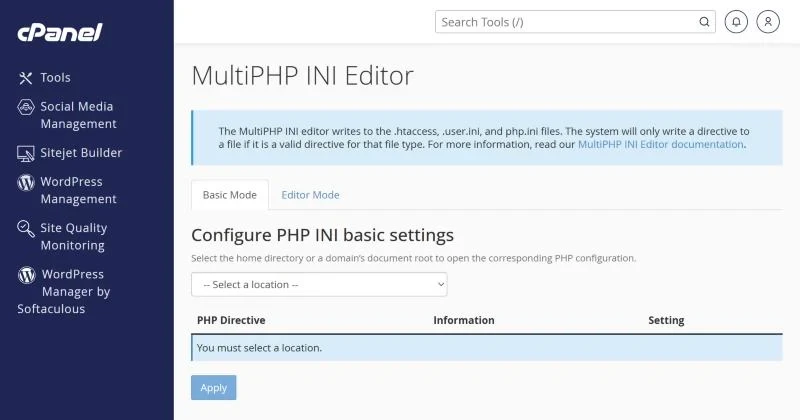
If a site keeps needing more and more memory, a plugin is usually leaking it – find it in step 5 rather than raising the limit endlessly.
Step 5: Disable plugins and theme (WordPress)
- In File Manager rename
wp-content/pluginstoplugins-off. - If the site loads, rename it back and then rename each plugin's folder one at a time until the error returns – that is the culprit.
- If plugins aren't the cause, rename the active theme's folder; WordPress falls back to a default theme.
Turn on WordPress debugging temporarily by adding define('WP_DEBUG', true); define('WP_DEBUG_LOG', true); to wp-config.php; errors are written to wp-content/debug.log. Switch it off again afterwards.
Step 6: Check the PHP version
Old code may break on PHP 8.x and new plugins may require PHP 8.1+. Change the version in Software → Select PHP Version (or MultiPHP Manager) and test. Keep a supported version – older ones no longer receive security updates.
Still a 500 error?
Resource limits can also produce 500 or 508 errors when traffic spikes – see resource limits and CPU usage. If nothing in the log makes sense, open a ticket with the exact time of the error and the URL; our team reads the server-side logs for you.
Frequently asked questions
Is a 500 error my fault or the host's?
Usually it is caused by the website's own code or settings – but on a good host, support helps you find it. A 500 on every site of the server at once is a server issue.
Does a 500 error hurt SEO?
A few minutes doesn't. If Google sees 500 errors for days, pages drop out of the index, so fix it quickly.
Hosting with real support. XMart Host plans run LiteSpeed with selectable PHP versions and support that reads error logs with you, 24/7. See WordPress hosting or web hosting in Pakistan.