
"Error establishing a database connection" means the website's code reached the server but MySQL/MariaDB refused it or didn't answer. In order of likelihood: the credentials in the config file are wrong, the database user isn't attached to the database, a table is damaged, or the account is out of space.
Screenshots come from a real cPanel account with usernames and database names replaced by example values.
Step 1: Compare the config file with cPanel
Open your site's config file in File Manager – for WordPress that is wp-config.php – and note four values: database name, user, password and host.
- On cPanel, database names and users always start with your cPanel username and an underscore, e.g.
cpuser_shop. - The host is
localhoston our shared hosting. - After a migration the prefix often changes – the old
olduser_shopno longer exists.
Step 2: Check the database and user in cPanel
Open Databases → Manage My Databases. Under Current Databases confirm the database exists and which users have privileges on it.
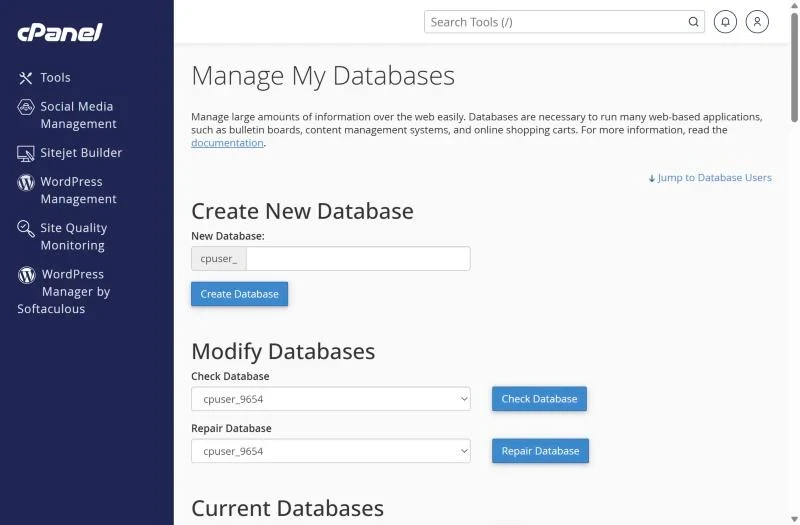
- If the user isn't listed next to the database, scroll to Add User To Database, choose both and grant All Privileges.
- If you aren't sure of the password, set a new one under Current Users → Change Password and put the same one in the config file.
Step 3: Repair the database
A crashed table can stop the site after a server restart or a full disk. In the same screen choose the database under Modify Databases → Repair Database and run it. Check Database lists damaged tables first.
Step 4: Make sure the account isn't full
When the disk quota is reached, MySQL can't write and the site may fail. See disk quota exceeded.
Step 5: Too many connections or slow queries
Under heavy traffic, uncached sites can run out of database connections. Caching (LiteSpeed Cache for WordPress) and removing heavy plugins helps – details in resource limits.
Remote connections
To connect from your computer or another server (for example a desktop app), add your IP in Databases → Remote Database Access and use the server host name instead of localhost. Only allow specific IPs, never %.
Frequently asked questions
Will repairing the database delete data?
Repair fixes the table structure and normally keeps the data. Still, download a backup in phpMyAdmin or the Backup tool first.
Why did it break when nothing changed?
Typical hidden causes are an automatic password change by a security plugin, a full disk, or a table that crashed during a restart.
Fast databases included. XMart Host plans run MariaDB on SSD/NVMe storage with daily backups. See WordPress hosting and web hosting in Pakistan.