
If your website, cPanel, webmail or FTP suddenly stops opening only for you – while it works on mobile data or for your colleagues – your office IP address has most likely been blocked by the server firewall. This is a security feature, not an outage. Here is how to confirm it, get unblocked and stop it from happening again.
Screenshots come from a real cPanel account; IP addresses and domains are replaced by example values.
How to tell it is an IP block
- The site times out or shows "connection refused" on your Wi-Fi, but opens on mobile data.
- Email apps on every computer in the office stop syncing at the same time.
- cPanel login page doesn't load at all (not a "wrong password" message).
Find your current public IP by searching "what is my IP" in Google – support will need it.
Why the firewall blocks IPs
Shared servers are attacked by password-guessing bots all day. The firewall (cPHulk and the server firewall) automatically blocks any address with too many failed logins in a short time. Typical triggers on a real customer's side:
- A phone or laptop still using an old email password after you changed it – it retries every few minutes and fails each time.
- An FTP client or backup tool with a wrong password.
- Several people in an office typing the cPanel password wrong (all share one public IP).
- A WordPress plugin or script sending repeated bad logins via SMTP.
- Malware on an office computer sending spam through your mailbox.
How to get unblocked
- Open a ticket or message our 24/7 WhatsApp support from mobile data with your public IP. We check the reason and remove the block.
- Most automatic blocks expire by themselves after a while, but the device with the wrong password will trigger it again – so fix that first.
- Update the password on every device: phones, Outlook, Thunderbird, FTP clients, website SMTP settings.
The cPanel IP Blocker is something different
Security → IP Blocker lets you block visitors from your website, for example a spammer or a scraping bot. If you accidentally added your own IP or a whole range, your site will show "403 Forbidden" for you.
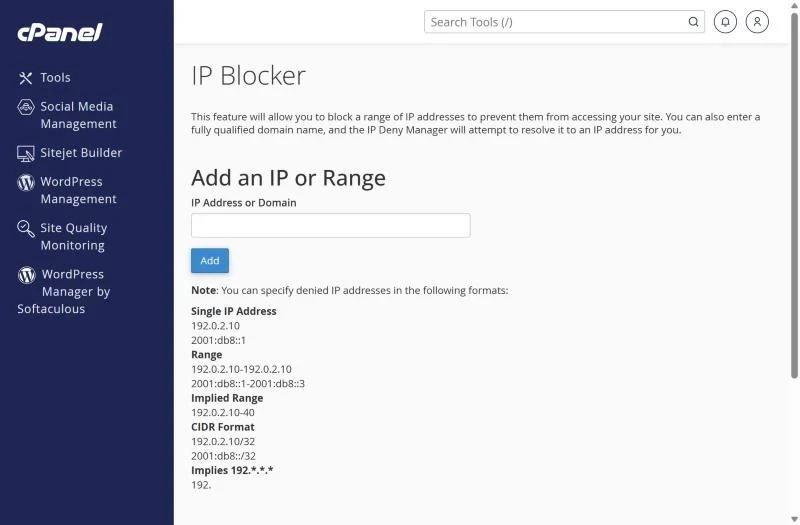
Scroll down to the list of blocked addresses and delete entries you don't recognise. Ranges like 192. block millions of addresses – use them carefully.
Your server IP or domain is on a blacklist
A different problem with a similar name: if outgoing email bounces with "listed on Spamhaus" or "poor IP reputation", the sending IP is on a public blacklist. Check it with a blacklist checker and send us the bounce – on shared hosting we handle delisting. Make sure no hacked form is sending spam first; see email not sending.
Preventing future blocks
- Use a password manager so every device gets the new password at once.
- Remove old email accounts from phones you no longer use.
- Turn on two-factor authentication for cPanel.
- If your office has a fixed IP, ask support to whitelist it.
Frequently asked questions
Can I unblock myself from cPanel?
Not from the firewall – you can't log in while blocked. Contact support from another connection. Blocks you created yourself in IP Blocker can be removed in cPanel.
Will my website be blocked for everyone?
No. Only the IP that failed the logins is blocked; your visitors are not affected.
24/7 help when you're locked out. XMart Host support answers on WhatsApp, phone and tickets in Urdu and English. See our web hosting in Pakistan or contact the team.