
Every XMart Host plan includes free SSL through cPanel's AutoSSL, so "Not Secure" warnings normally have one of four causes: the certificate hasn't been issued yet, the site isn't forced to HTTPS, the page loads some files over http (mixed content), or a proxy like Cloudflare is set up the wrong way.
Screenshots come from a real cPanel account with domains replaced by example values.
1. Is there a valid certificate?
AutoSSL issues free certificates automatically, but only for domains whose DNS already points to the server. Open Security → SSL/TLS Status and look at your domain:
- Green / AutoSSL Domain Validated – certificate is fine, continue with step 2.
- Red with a DNS error – the domain or
wwwdoesn't point here yet. Fix DNS (DNS guide), then click Run AutoSSL. - New domains and subdomains are covered at the next AutoSSL run; ask support if you need it immediately.
2. Force HTTPS
A certificate alone doesn't move visitors from http to https. In Domains → Domains switch on Force HTTPS Redirect for the domain.
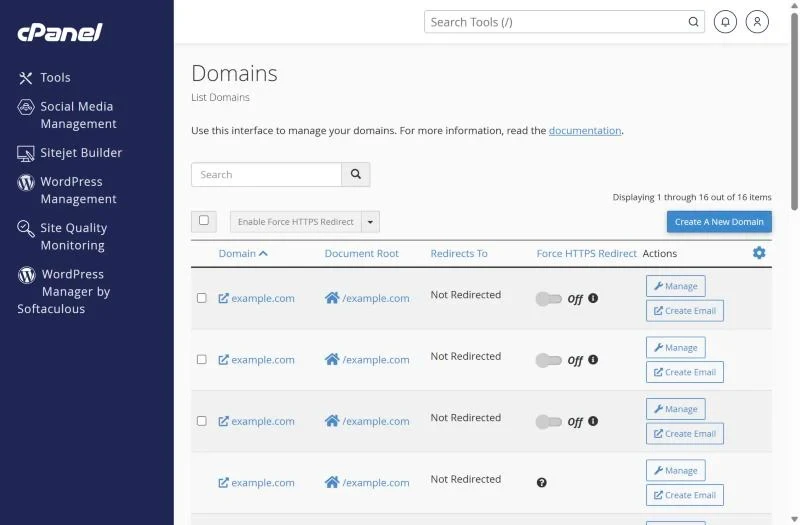
For WordPress also set both addresses in Settings → General to https://. Don't stack several HTTPS redirects (cPanel switch + plugin + Cloudflare rule) – that causes "too many redirects".
3. Fix mixed content
If the padlock shows a warning even with a valid certificate, the page loads images, scripts or fonts over plain http. Open the browser console (F12) to see which files. Fix them by:
- Running a search-and-replace of
http://yourdomain.comtohttps://yourdomain.comin the database (Better Search Replace plugin for WordPress). - Updating hard-coded links in theme files and page builders.
- Replacing external http resources with https versions.
4. Cloudflare settings
With Cloudflare's proxy on, set SSL/TLS mode to Full or Full (strict). "Flexible" talks to the server over http and creates redirect loops with Force HTTPS.
5. Wrong certificate or name mismatch
If the browser shows a certificate for a different name (often the server host name), the domain isn't set up on the account or DNS for www points somewhere else. Add the domain in cPanel and fix the www record, then run AutoSSL.
Frequently asked questions
Is the free SSL good enough for an online store?
Yes. AutoSSL certificates use the same encryption as paid domain-validated certificates and are trusted by all browsers. Paid OV/EV certificates only add company verification.
How often does AutoSSL renew?
Automatically before expiry, as long as DNS still points to the server.
Free SSL on every plan. All XMart Host hosting plans include AutoSSL and HTTPS by default – ideal for online stores in Pakistan.