
This guide covers the mailbox problems that come up every day: webmail won't log in, the mailbox is full, attachments are refused, POP3 or IMAP doesn't sync, and forwarders don't forward. Each section starts with the quickest check.
Screenshots are from a real cPanel account with domains, IPs and usernames replaced by example values.
Webmail login fails
- Use the full email address as the username, not just "info".
- Reset the password in Email → Email Accounts → Manage. Passwords copied from WhatsApp often include a trailing space.
- Open webmail at
https://yourdomain.com/webmailorhttps://yourdomain.com:2096. If your office network blocks port 2096, try mobile data. - Several wrong attempts block your IP for a while. If you see "connection refused" everywhere, read how to unblock your IP.
Mailbox full / quota exceeded
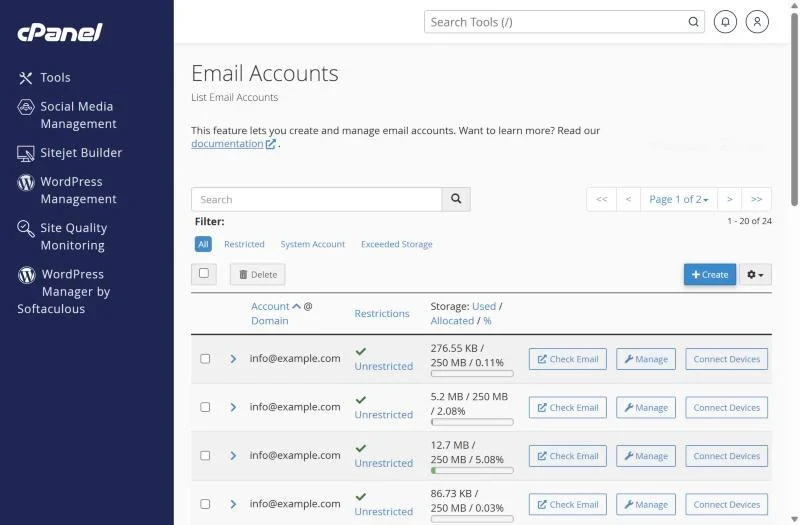
The Email Accounts list shows used and allocated storage for every mailbox. When a mailbox reaches 100% new mail bounces with "mailbox full".
- Click Manage and raise the allocated storage, or set it to Unlimited within your plan's disk space.
- Delete large old messages and empty Trash and Spam – in webmail these folders still count.
- Use Email → Email Disk Usage to delete old mail by folder and date in one step.
- If the whole hosting account is full, see disk quota exceeded.
Attachment too large
Most mail servers, including Gmail and Outlook, refuse messages above about 25 MB. Remember that attachments grow by roughly a third when encoded for email, so a 20 MB file can already be too big. Share large files with a cloud link instead.
POP3 / IMAP settings
| Protocol | Server | Secure port |
|---|---|---|
| IMAP (recommended) | mail.yourdomain.com | 993 (SSL/TLS) |
| POP3 | mail.yourdomain.com | 995 (SSL/TLS) |
| SMTP (outgoing) | mail.yourdomain.com | 465 (SSL/TLS) or 587 |
Use IMAP if you read mail on more than one device – POP3 downloads and usually deletes messages from the server, which is why mail "disappears" from the phone after the laptop checks it. The exact settings for each mailbox are under Connect Devices.
Forwarders not forwarding
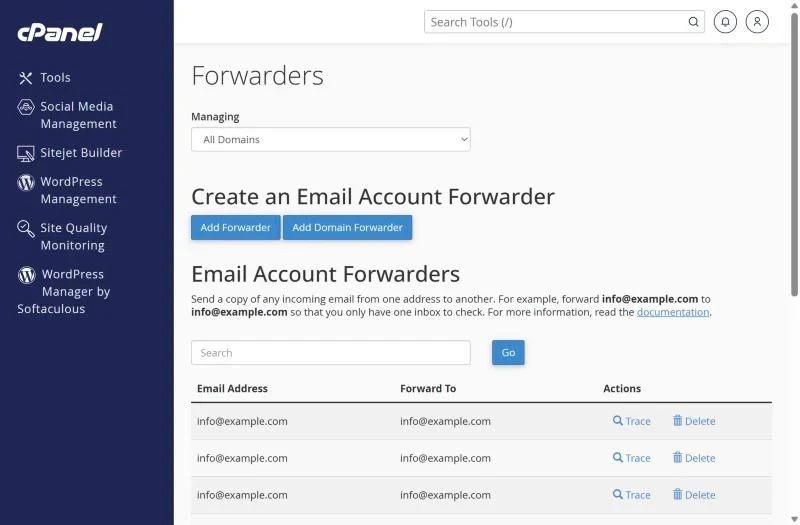
- Click Trace next to the forwarder to see the route a message takes.
- If the domain's mail is hosted at Google or Titan, cPanel forwarders are not used at all – create forwarding there.
- Gmail may silently drop forwarded spam and then distrust the forwarder; prefer fetching the mailbox via POP3 inside Gmail.
- Remove circular forwarders (A → B → A) – they cause "mail loop" bounces.
Missing folders or messages after moving hosts
Folders created on the old server only come across if the mailboxes were migrated with IMAP. Our free migration copies mailboxes with folders included – just tell support which accounts to move.
Frequently asked questions
Is webmail the same password as cPanel?
No. Each mailbox has its own password. The cPanel password opens the control panel and the default account only.
Why does my phone keep asking for the password?
The password was changed or the app uses port 25/110 without encryption. Re-enter the account with the Connect Devices settings.
Email for a growing team? Shared mailboxes, calendars and Drive work best on Google Workspace; for low-cost mailboxes see Titan Email in Pakistan.