
Most "page not found" and "redirect not working" problems in cPanel come down to one question: which folder does this address point to, and what rules run before the page loads? This guide answers that for 404 errors, redirects, subdomains and addon domains.
Screenshots come from a real cPanel account with domains and IPs replaced by example values.
Check the document root first
Open Domains → Domains. The Document Root column shows the folder each domain and subdomain serves files from.
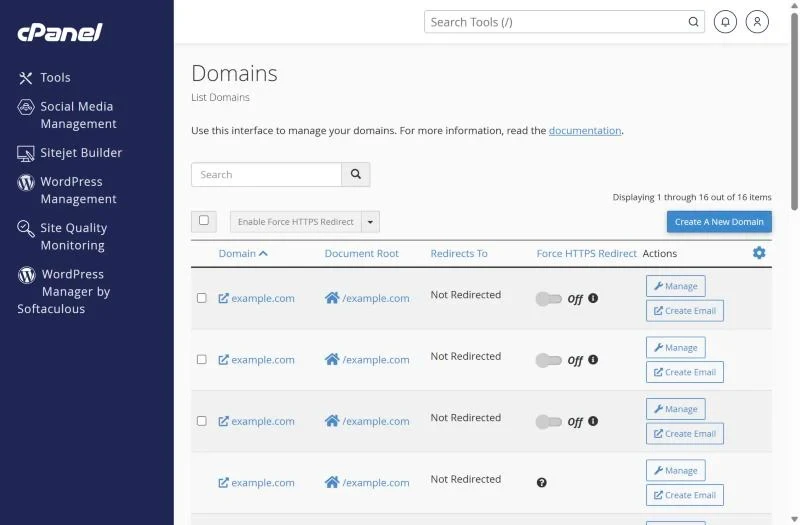
- A subdomain such as
shop.yourdomain.comnormally has its own folder, e.g./public_html/shop. - If you uploaded files to a different folder than the one listed, you will get a 404 or the server's default page.
- The "Redirects To" column shows domain-level redirects that override everything else.
404 Not Found
- File really missing? Linux file names are case-sensitive:
About.htmlandabout.htmlare different files. - WordPress pages 404 but the home page works? The rewrite rules are missing. Go to Settings → Permalinks and click Save to rebuild
.htaccess. - Everything 404s after a migration? The files are probably one level too deep, e.g.
public_html/public_html/index.php. Move them up. - Old URLs from a previous site? Add 301 redirects to the new pages so visitors and Google land in the right place.
Redirect not working
Create redirects in Domains → Redirects:
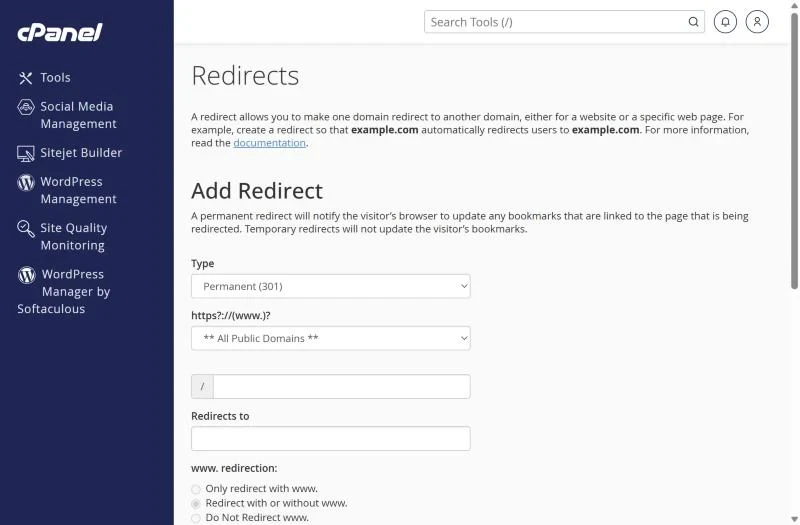
- Use Permanent (301) for moved pages; 302 only for short tests.
- Leave the path empty to redirect the whole domain; enter a path like
old-pagefor a single page. - cPanel writes the rule into
.htaccess. If WordPress or another rule above it handles the request first, the redirect never runs. Openpublic_html/.htaccessand move the cPanel redirect lines above the# BEGIN WordPressblock. - A redirect loop ("too many redirects") usually means two rules send the visitor back and forth – often http→https in .htaccess plus the opposite in a plugin or Cloudflare's "Flexible SSL". Keep only one HTTPS rule and set Cloudflare to "Full".
Subdomain not working
- Create it under Domains → Create A New Domain (current cPanel) – the old "Subdomains" icon now opens the same screen.
- If DNS is not at our nameservers, add an A record for the subdomain at your DNS provider pointing to the hosting IP.
- "The server IP address could not be found" means the DNS record is missing or hasn't propagated yet – see DNS propagation.
- For SSL on a new subdomain, wait for AutoSSL to run or ask support to run it – see the SSL guide.
Addon domain opens the main website
The addon was created with "Share document root" ticked, so it serves public_html. Remove it and add it again with its own folder. If you want it to show the main site, that is an alias – read parked domains and aliases.
Frequently asked questions
Should I redirect deleted pages to the home page?
Only when there is no closer match. Redirect each old URL to the most similar new page – Google treats mass redirects to the home page like 404s.
Why does my redirect work in one browser but not another?
Browsers cache 301 redirects. Test in a private window after every change.
Let us move it for you. Changing hosts is when most redirects break. Our free migration keeps your URLs, redirects and email working. Plans start in PKR on web hosting in Pakistan.